Help › Sending
A/B test the subject, and resend to people who did not open
Both are on the Pro plan.
A/B test the subject
- In the campaign, open A/B test the subject under the subject and write Subject B.
- Choose how much of the audience gets each subject (10% to 25%), how long to wait (1 hour to 24 hours), and whether the winner has more opens or more clicks.
- Press Save, then Send now or Schedule.
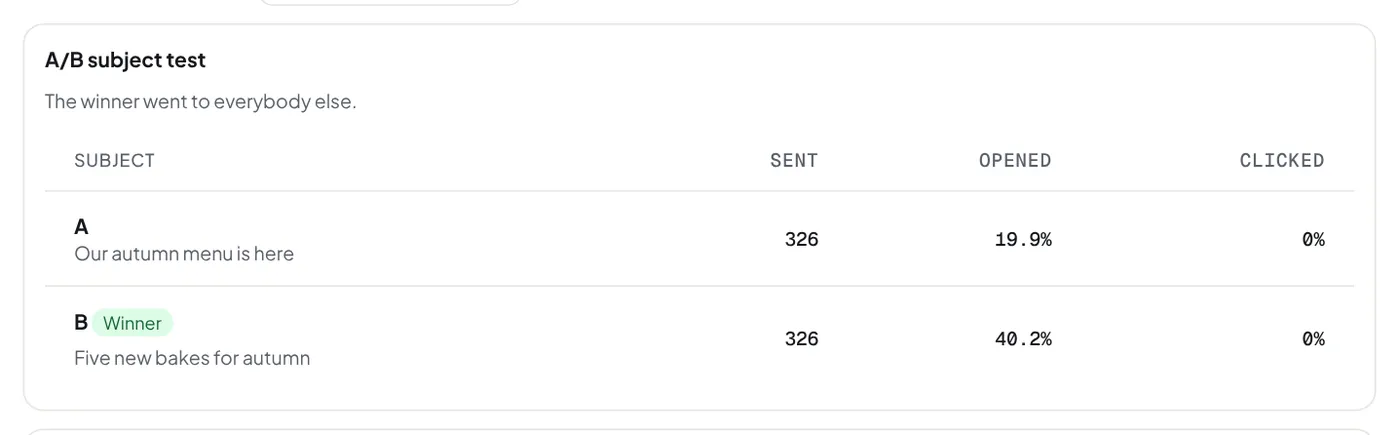
Each subject goes to its share of the audience, chosen at random. After the wait, the subject with more opens (or clicks) goes to everybody else, by itself. When they are level, the other measure decides; when both are level, subject A goes. The campaign page and its report show both subjects, their numbers and the winner.
- It needs at least 100 people in the audience.
- It does not go with "only the first N".
- Every check of a normal send runs at the start and again before the winner goes. The whole audience counts against your plan.
- A test email uses subject A.
- Opens are not sure: some mail apps (Apple Mail) open every email by themselves. Clicks are surer, but need a link people want to press.
Resend to people who did not open
On a sent campaign, or its report, press Make a copy for them under Resend to people who did not open. It makes a draft for the people it was sent to who did not open or click it. Give it a new subject, then send it. Wait a day or two first. People who unsubscribed since are left out. People whose mail app opened the email by itself count as opened, so they do not get it again.
Did this answer your question? If not, contact us or use the chat button.