Help › Sending
Send or schedule a campaign
Choose who it is for: everyone subscribed, or the tags you tick, plus any addresses you type (they must be subscribed contacts). Then open Send under the email.
Tag rules. Under the tags, People need chooses any of the ticked tags (a person with one of them gets it) or all of them (for example only people with both "customers" and "London"). Leave out people with these tags takes people out, for example everyone subscribed except "wholesale". Addresses you type always get the email.
The send is blocked, with the reason, when: there is no verified sending domain; your address is not in Settings; anybody in the audience has no lawful basis; your plan's monthly emails would be passed; or the campaign is an A/B test or a resend and your plan is not Pro.
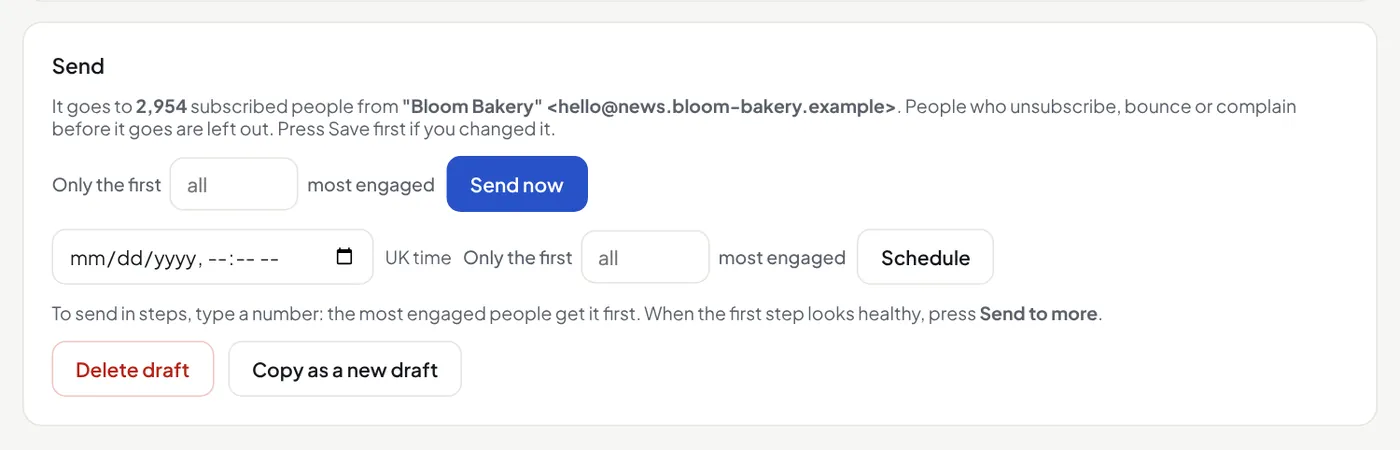
- Send now starts within a minute.
- Send in steps: type a number in Only the first … most engaged. The people who opened or clicked most recently get it first. When that step looks healthy, press Send to more on the campaign or its report: the next people get it, and nobody gets it twice.
- Schedule takes UK time. The checks run again at that time.
- Pause stops it; Resume goes on. Nobody gets it twice.
- A/B test (Pro): two subjects first, then the winner to everybody else. It does not go with "only the first N". See A/B test the subject.
The first big send on the Free plan
On the Free plan, your first send to more than 100 people waits for a quick check by the Mailfly team, for spam. This protects the inbox delivery of every Mailfly customer. The campaign shows In review, and nothing goes yet. We email you when it is approved and starts to send, or the reason when it is not approved. Sends to 100 people or fewer go at once. After one approved send, your next sends need no check. To change a campaign that waits, press Cancel the request: it is a draft again.
A campaign pauses by itself if more than 4% of emails bounce or more than 0.1% of people mark it as spam. From 2% bounces or 0.08% complaints, the campaign page shows a warning.
Engagement
Under the tags you can send only to people who opened or clicked in the last 90 days, 6 months or 12 months. You can also leave out people with no opens or clicks for 12 months. These need open and click tracking (Settings). Typed addresses always get the campaign.