Help › Sending
Automations: emails, waits, If/else paths and tags
Open Automations, give it a name, choose what it starts from and press Make it. It starts switched off. Two ready flows:
- After a purchase: a thank-you when a person gets the tag customer, and a review request 3 days later. With Shopify connected (Settings → Shopify), each order adds the tag by itself. Other shops can add it through the API, Zapier or Make, or you add it by hand.
- Welcome, then a nudge: a welcome; 2 days later, people who opened it get the tag "engaged", and people who did not get a short second email.
What your plan has
| Free | No automations. You can build one and switch it on after an upgrade. |
|---|---|
| Starter | One welcome automation on at a time: it starts when a person joins (any new subscriber, or through one form), with one email and a wait before it if you want. |
| Pro and Power | Every step and trigger on this page, as many automations as you want. |
If your plan goes down, automations the new plan does not have are switched off, and you get an alert. Nothing is deleted.
What starts it
- A person gets a tag (for example "customer").
- Every new subscriber, or people who join through one form.
- A person clicks a link in any of your emails whose address has some words, for example "ovens" or "/sale" (a link trigger).
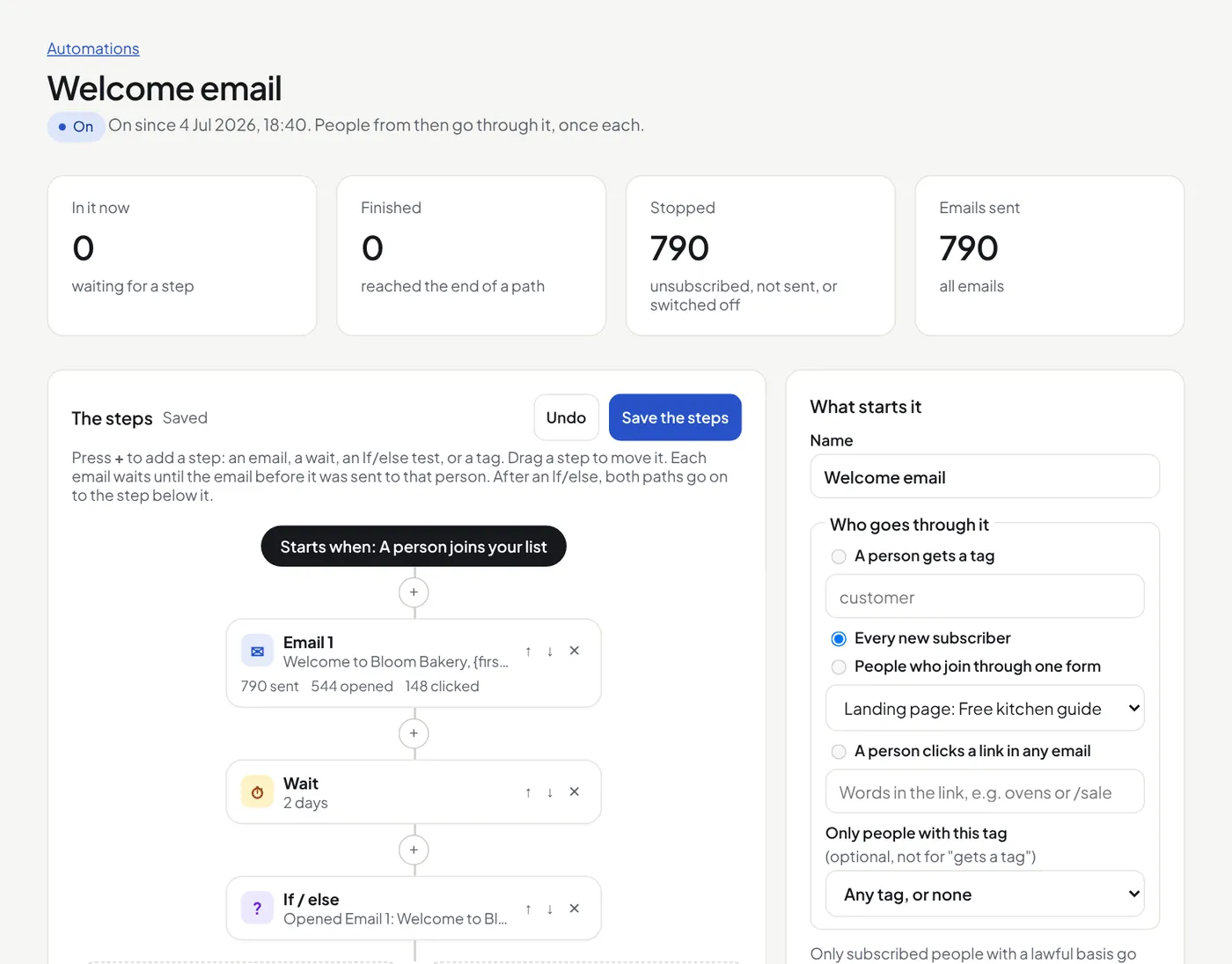
The steps
Press + between two steps to add one. Drag a step onto a + to move it, or use the arrows. Click a step to change it. Then press Save the steps.
- Email: choose a template, save, then press Edit and test. It is the same editor as a campaign. An email waits until the email before it was sent to that person.
- Wait: minutes, hours or days, up to 90 days.
- If / else: people who pass the test go down Yes, the others down No. Tests: opened an email, clicked in an email, has a tag, or clicked a link with some words. Put a wait before it, so people have time to open or click. After both paths, people go on to the step below the If/else.
- Add a tag or Remove a tag. A tag added here can start another automation.
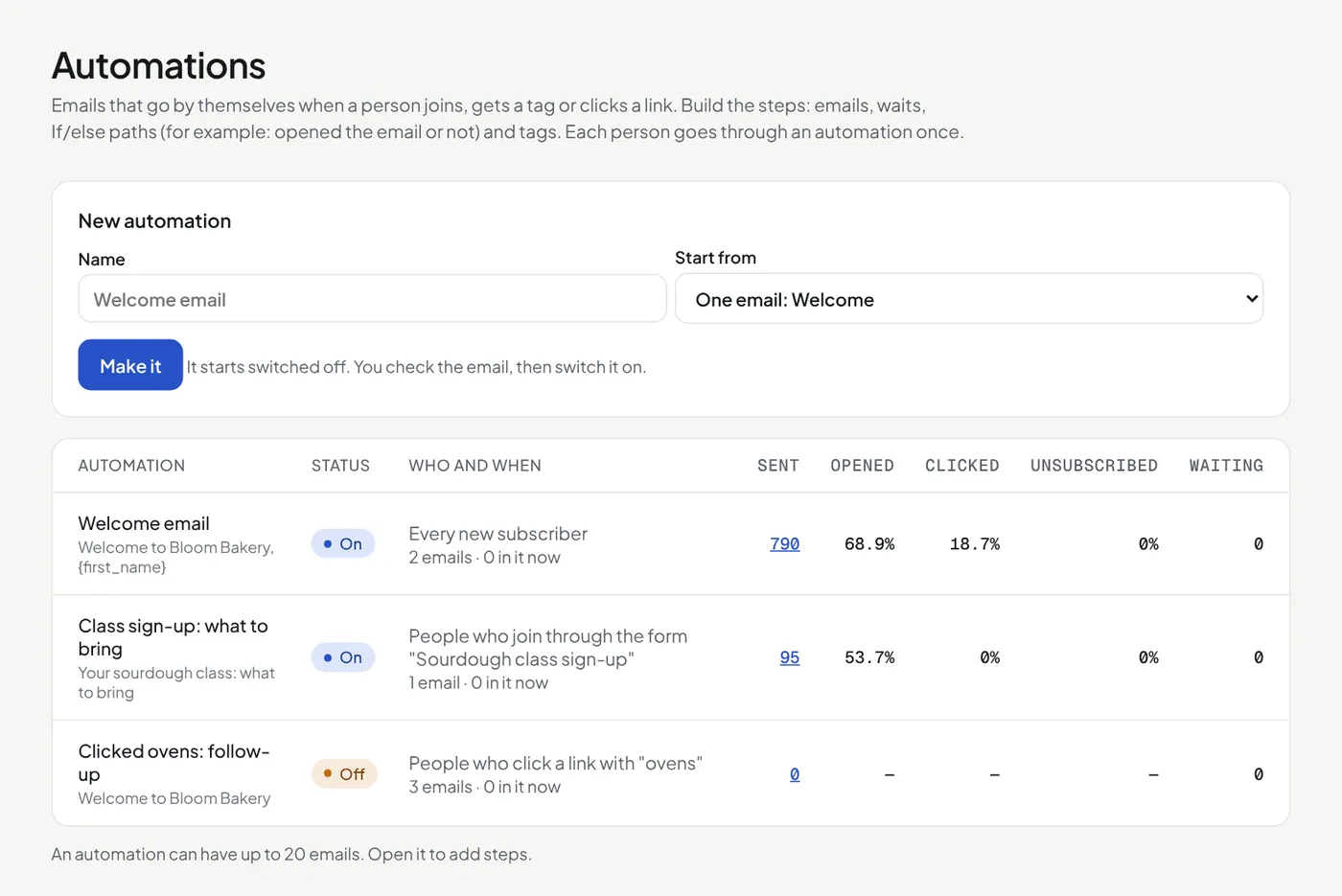
Each step shows how many people are there now. Each email shows how many got it, opened it and clicked. The Automations list shows the open, click and unsubscribe rates of each automation.
Good to know
- Only people who join, get the tag or click after you switch it on go through it. Nobody already on your list does.
- Each person goes through an automation once, even if they get the tag again later.
- Steps you add after the last step reach people who had already finished, from the moment you save. The page tells you how many before you save.
- Someone who unsubscribes, bounces or complains gets no more emails from it.
- Only subscribed people with a lawful basis get it. A review request is often marketing: for customers, "soft opt-in" usually covers it when they could say no at checkout.
- "Opened" is not sure: some mail apps (Apple Mail) open every email by themselves. Clicks are surer.
- Switch it off at any time. The people in it stop, and emails that were waiting are not sent.
- These emails count towards your plan's limits, and the warm-up of a new sending domain.
- It switches off by itself above 4% bounces or 0.1% spam complaints.
Did this answer your question? If not, contact us or use the chat button.